 . In the right hand column is a link to the latest post, together with a link to the profile of the person who posted it.
If you've just joined and you can't see many posts (messages) please take a look at Members Only Boards
The first page you see when you have logged in is the Index Page.

Working from the top, to the right of the 'Midlands Rat Club' is a link to any private messages (PMs) that have been sent to you. Below this is a solid orange stripe, then a softer stripe with links to various features of the forum. 'Forum Home' will always bring you back to the index page. 'Help' brings you to the help index. 'Calendar' brings you to the calendar which shows events and the birthdays of those who have entered this into their profile. 'Search', as you would expect, brings you to a search page. 'Profile' takes you to an area where you can enter and amend your preferences and details. Finally, 'Logout' will log you out of the forum.

The grey strip shows whereabouts you are in the forum. On this page it simply shows the index page.
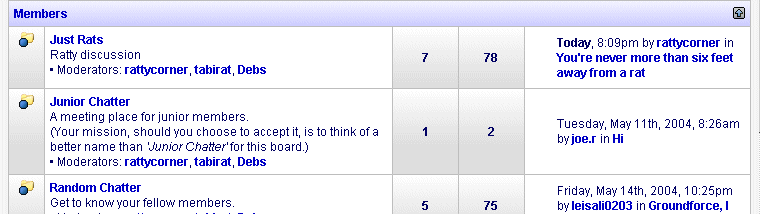
This shows all of the categories and boards that you can access. The categories are headed 'Members', 'Information', and 'Non Members'. There is a small arrow on the right of the blue strip showing the category heading. This will fold up the category so that you can see just the heading.
The various boards and their descriptions are listed beneath the category headings. For example, the 'Members' board contains 'Just Rats', 'Junior Chatter', 'Random Chatter' and 'Classified Ads'. If a board has new posts in it, the blue light on the folder image will flash. . In the right hand column is a link to the latest post, together with a link to the profile of the person who posted it.

Below the boards and categories is a button which will let you mark all of the current messages as read. This is useful if you have been away for a while and you don't want to read all of the old posts.
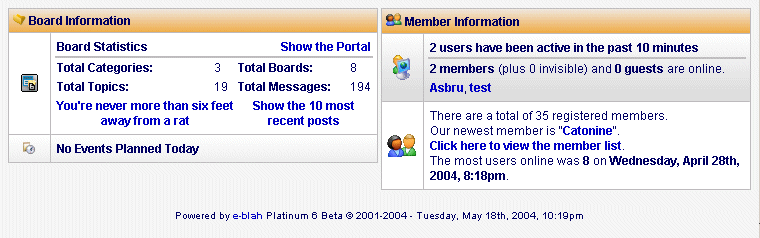
At the bottom of the page are two boxes containing Board Information and Member Information. Looking at 'Board Information', you might find the 'Show the Portal' link interesting. It takes you to an alternative index page which displays the information differently. Below this link are some board statistics, then a link to the very latest post and any events from the calendar which occur in the next week. If you've entered your birthday in your profile then your birthday will show up here on the day.
The 'Member Information' panel lets you know how many others are online with you. You can also access the profile of the most recent new member and a list of all members.
